Why I Built portree — Git Worktree Server Manager

"you should use worktrees"
This tweet nails it:
you should use worktreesyou just have to..
- npm install in the worktree
- reinstall the pre-commit hooks
- copy the env files
- not use the same ports
or realize this is not the right solution
I laughed. Then I thought — "Everything except that last line can be automated."
The Port Problem
If you work on a monorepo with, say, a React frontend on :3000 and a Python backend on :8000, one branch is fine. But git worktree lets you check out multiple branches simultaneously, and that's where things get annoying.
git worktree add ../myapp-feature-auth feature/auth
git worktree add ../myapp-fix-header fix/header
Three branches, each needing its own frontend and backend. That's six dev servers. Port 3000 can only be used once.
So you start manually offsetting ports — 3001, 3002, 3003. Thirty minutes later, you don't remember which port belongs to which branch. You update environment variables, change backend URLs in the frontend config, and repeat the process every time you switch context.
The worst part: you run feature/auth frontend against main backend without realizing it, and spend 20 minutes debugging something that isn't a bug.
This should be automated.
I Found portless After the Fact
After I'd nearly finished building portree, I found Vercel Labs' portless. Genuinely didn't know it existed until the day before.
It replaces port numbers with named .localhost URLs — myapp.localhost:1355 instead of localhost:3000. The direction felt similar. For a moment I thought someone had already solved this.
But the scope is different. portless is a proxy layer over servers that are already running. It doesn't manage server lifecycle, and it has no concept of git worktrees.
What I wanted was: "Add a worktree, and all services start on the right ports, accessible by branch name." Port naming alone doesn't cover that. I needed port allocation, process management, and service discovery — all in one tool.
What portree Does
portree — Git Worktree Server Manager. The name is port + tree. Written in Go.
portree init          # Initialize
portree up --all      # Start all services across all worktrees
portree open          # → http://main.localhost:3000
Three core ideas:
1. Deterministic Port Allocation
Branch name + service name → FNV32 hash → port number.
FNV32("main:frontend") % 100 + 3100 → 3100
FNV32("feature/auth:frontend") % 100 + 3100 → 3117
Same branch, same service, same port every time. On hash collision, linear probing finds the next available port.
2. Server Lifecycle Management
Define services once in .portree.toml, and every worktree runs the same configuration:
[services.frontend]
command = "pnpm run dev"
dir = "frontend"
port_range = { min = 3100, max = 3199 }
proxy_port = 3000

[services.backend]
command = "python manage.py runserver 0.0.0.0:$PORT"
dir = "backend"
port_range = { min = 8100, max = 8199 }
proxy_port = 8000
portree up --all starts everything. portree down --all stops everything. Processes are managed as groups — SIGTERM first, SIGKILL after timeout. No orphaned child processes.
3. Branch-Name Routing
portree proxy start runs a reverse proxy that routes based on the Host header subdomain:
http://main.localhost:3000          → frontend (main)
http://feature-auth.localhost:3000  → frontend (feature/auth)
http://main.localhost:8000          → backend (main)
http://feature-auth.localhost:8000  → backend (feature/auth)
*.localhost resolves to 127.0.0.1 per RFC 6761 — no /etc/hosts editing needed.
Environment variables are injected automatically. $PORT tells your server which port to bind. $PT_BACKEND_URL tells your frontend where the backend is. Services discover each other without manual configuration.
Interesting Engineering Details
TOCTOU in Port Allocation
There's a gap between checking if a port is free and the service actually binding it. Another process could take the port in between (Time-of-Check-Time-of-Use).
File-level locking (flock) prevents race conditions between concurrent portree invocations. For external collisions, a clear error message tells you what happened.
Process Groups
Dev servers often spawn child processes (e.g., Next.js SWC compiler). Killing only the parent leaves orphans.
cmd.SysProcAttr = &syscall.SysProcAttr{Setpgid: true}
Setpgid: true creates a process group. On shutdown, syscall.Kill(-pgid, syscall.SIGTERM) takes down everything cleanly.
WriteTimeout = 0
Go's http.Server conventionally sets a WriteTimeout. For a dev server proxy, I intentionally set it to 0 (unlimited). Vite and webpack HMR use SSE with persistent connections — a fixed write deadline kills the stream.
srv := &http.Server{
    ReadTimeout:       30 * time.Second,
    ReadHeaderTimeout: 10 * time.Second,
    IdleTimeout:       120 * time.Second,
    // WriteTimeout intentionally 0: don't kill HMR SSE streams
}
Following security best practices vs. understanding your use case. For a local dev tool, the latter wins.
TUI Dashboard
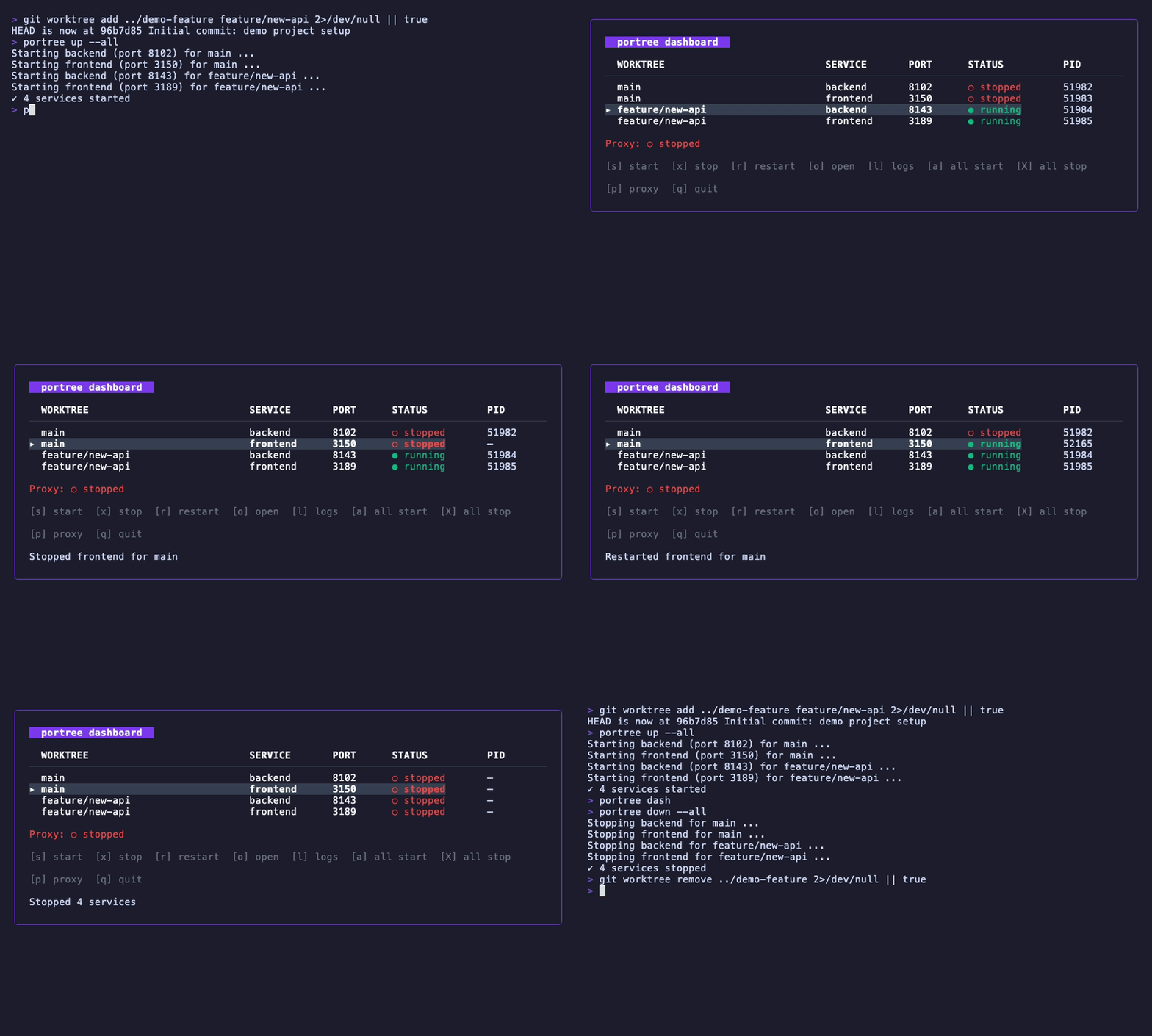
A TUI to see all worktrees and services at a glance. Built with Bubble Tea + Lip Gloss.
╭─ portree dashboard ────────────────────────────────╮
│                                                     │
│  WORKTREE        SERVICE    PORT   STATUS    PID    │
│ ▸ main           frontend   3100   ● running 12345  │
│   main           backend    8100   ● running 12346  │
│   feature/auth   frontend   3117   ○ stopped —      │
│                                                     │
│  [s] start  [x] stop  [r] restart  [q] quit        │
╰─────────────────────────────────────────────────────╯
s to start, x to stop, o to open in browser. Manage all branches without leaving the terminal.
portree vs portless
Same space, different approaches.
| portless | portree | |
|---|---|---|
| Philosophy | Replace ports with names | Manage dev environments per worktree |
| Process management | None (proxy only) | Full lifecycle (start/stop/restart) |
| Port allocation | Random | Deterministic (FNV32 hash) |
| Named URLs | Yes | Yes (branch-name.localhost) |
| Worktree support | No | Core feature |
| HTTPS | Yes (auto-certs) | In progress |
| TUI | No | Yes |
| Language | TypeScript | Go (single binary) |
portless is a general-purpose tool. portree is built specifically for git worktree workflows. They share features like named URLs and HTTPS (portree's is in progress), but portree adds process management, automatic port allocation, worktree integration, and a TUI.
Try It
brew install fairy-pitta/tap/portree
Or check it out on GitHub.

Newsletter
Subscribe to receive new articles directly in your inbox.